
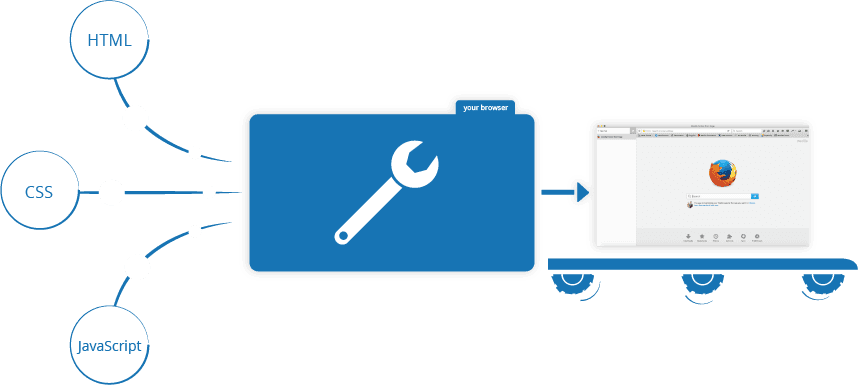
How Browsers, Servers, and JavaScript Work Together #
I'll break this down step-by-step with clear explanations and diagrams.
Let's start with the big picture: When you type a URL (e.g., https://rvimmandev.vercel.app) in your browser and press Enter, several things happen: Step 1: DNS Lookup
- The browser needs to find the server's IP address. It asks a DNS server to translate the domain name to an IP address. Step 2: Establishing a Connection
- The browser uses TCP (Transmission Control Protocol) to establish a connection to the server at the IP address, typically on port 80 (HTTP) or 443 (HTTPS). Step 3: Sending an HTTP Request
- The browser sends an HTTP request to the server. For example: GET /index.html HTTP/1.1 Host: https://rvimmandev.vercel.app Step 4: The Server Processes the Request
- The server (which is a computer program running on a machine) receives the request and decides how to handle it.
- It might read a file from disk (like index.html) or generate content dynamically (using PHP, Python, etc.).
- The server then sends back an HTTP response, which includes:
- Status code (e.g., 200 OK)
- Headers (e.g., Content-Type: text/html)
- The actual content (e.g., the HTML of the page)
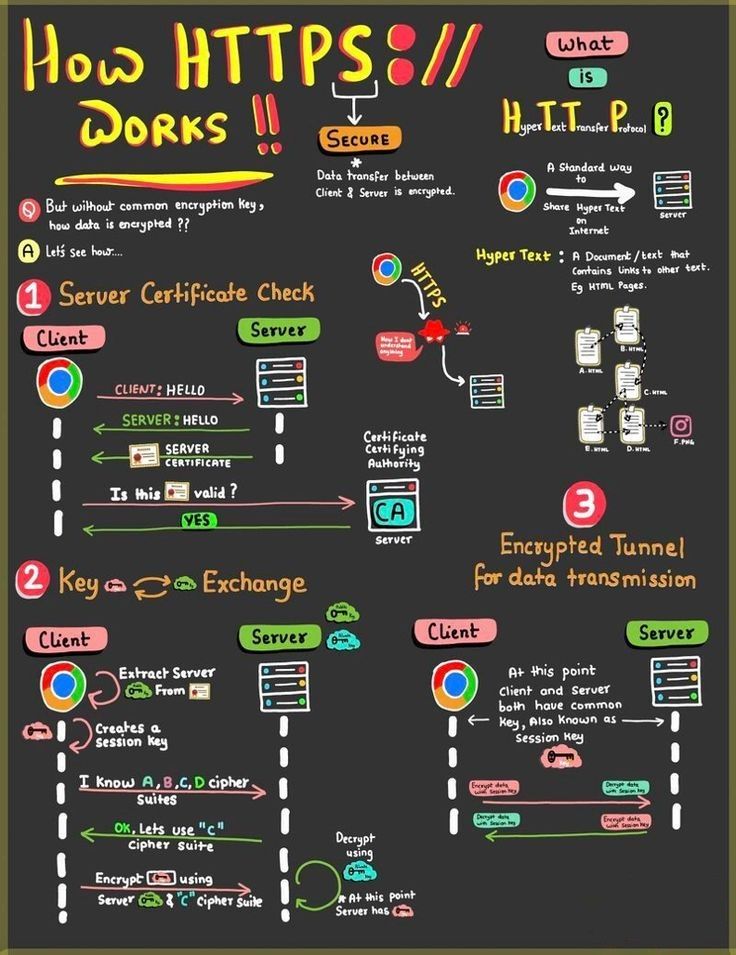
Step 5: The Browser Renders the Page
- The browser receives the response and starts rendering the page. Now, let's dive into each part.
1. Core Browser Architecture #
Browsers (like Chrome, Firefox) are complex applications with multiple components:
A browser is made up of several components:
- User Interface (UI): The address bar, back/forward buttons, bookmarks, etc.
- Browser Engine: Coordinates between the UI and the rendering engine.
- Rendering Engine: Responsible for displaying the content. For example, Blink in Chrome, Gecko in Firefox.
- Networking: Handles network calls (HTTP requests, etc.)
- JavaScript Interpreter: Parses and executes JavaScript (e.g., V8 in Chrome, SpiderMonkey in Firefox).
- UI Backend: Draws basic widgets (like combo boxes, windows).
- Data Storage: Persistence layer (cookies, local storage, IndexedDB).
Key Components: #
Rendering Engine:
- Parses HTML → Builds DOM Tree (Document Object Model).
- Parses CSS → Builds CSSOM Tree (CSS Object Model).
- Combines DOM + CSSOM → Render Tree (only visible elements).
- Layout: Calculates element positions/sizes.
- Paint: Converts render tree to pixels.
JavaScript Engine:
- Executes JS code.
- Uses a call stack (for function execution) and heap (memory storage).
2. How Servers Work #
Servers respond to browser requests:
A server is a computer program or device that provides functionality for other programs or devices (called "clients"). In web context:
- A web server (like Apache, Nginx, or Microsoft IIS) listens on a port (usually 80 or 443) for incoming HTTP requests.
- When a request arrives, the server processes it and sends back a response. Steps in a simple static web server:
- Listen: The server starts and listens on a specific port.
- Accept: When a client (browser) connects, the server accepts the connection.
- Read: The server reads the HTTP request.
- Process: The server maps the requested URL to a file on the disk (for static content) or to a program (for dynamic content).
- Write: The server writes an HTTP response (with headers and the content) and sends it back to the client. For dynamic content, the server might pass the request to an application (written in Python, Ruby, PHP, etc.) which generates the content.
Server Flow: #
- Browser Sends HTTP Request:
GET /index.html(URL, headers, cookies).
- Server Processes Request:
- Static files: Sends file directly.
- Dynamic content: Talks to databases/APIs (e.g., via Python/PHP).
- Server Sends HTTP Response:
- Status code (e.g.,
200 OK). - Headers (e.g.,
Content-Type: text/html). - Body (e.g., HTML/CSS/JS files).
- Status code (e.g.,
3. How JavaScript Runs in the Browser #
Execution Flow: #
- JavaScript Execution:
- The browser has a JavaScript engine (like V8) that executes JavaScript code.
- When the browser encounters a
Loading discussion...